
Smoobu Review 2026:
Pricing, Pros and Cons
Smoobu lets hosts manage calendars, rates and guest messages for Airbnb, Booking.com and other booking sites in one place. Instead of taking a percentage of your revenue, it mainly charges a flat monthly fee per property. That makes Smoobu attractive for properties with high nightly rates, but it asks for more hands-on work elsewhere.
In this review, we cover Smoobu pricing, where the channel manager works well day to day and which hosts are better served by another tool. Our assessment is based on independent research and industry experience.
Smoobu Review in Short: Our Verdict for Hosts
Predictable costs, strong integration with Airbnb and Booking.com and a commission-free direct booking website are Smoobu’s real strengths. Especially for properties with high nightly rates, the flat monthly fee saves noticeably compared to commission models. The trade-off is manual work: you maintain descriptions, photos and amenities separately in each channel, and features like dynamic pricing or task management come as add-ons or through the Marketplace. If you rent out a few properties mainly on Airbnb and Booking.com and like to run your own workflows, Smoobu makes a strong case. If you serve many channels or want to manage a growing portfolio centrally, the extra workload quickly eats up the savings.
Smoobu Strengths & Weaknesses
STRENGTHS
- Subscription-based with predictable costs
Flat monthly fees avoid revenue-based scaling. Properties with high nightly rates benefit from fixed costs versus commission-based alternatives. - Strong API integration for Airbnb & Booking.com
Real-time synchronization minimizes double-booking risk. Full feature integration includes rates, fees, discounts, and guest messaging
WEAKNESSES
- No property content synchronization
Descriptions, photos, amenities, etc must be managed separately in each channel’s interface, greatly increasing effort when changes occur - Restricted channel integration depth
Some major channels, like VRBO, sync their availabilities via iCal. The delayed sync reintroduces the risk of double bookings
In this Review
- Smoobu Key Features
- Channel Management & Property Management System
- Managing Calendars and Stays with Smoobu
- Guest Pricing & Payments
- Customer Support & Onboarding
- Direct Booking Website
- User Experience & Interface
- Smoobu Pricing: Plans and Costs per Property
- Conclusion: Who is Smoobu for?
- Alternatives to Smoobu
- Frequently Asked Questions
Smoobu Key Features
| Feature | Availability |
|---|---|
| Company Origin | Berlin, Germany |
| Languages (Application & Support) | English, German, Spanish, Italian, French, Portuguese, Greek, Polish |
| Channels supported (real-time sync) | ~ 16 |
| iCal Support | ✓ Yes |
| Supported Booking Types | ✓ Instant | ✓ On Request |
| Central Calendar | ✓ Yes |
| Multi-Unit Management | ✓ Yes |
| Property Data Sync | ✗ No |
| 3rd Party Integrations | ✓ ~ 51 Tools |
| Direct Booking Website | Booking Module | ✓ Yes | ✓ Yes |
| Automated Payment Processing | ✗ Limited |
| Unified Inbox | ✓ For Airbnb & Booking.com |
| Guest CRM / Automated Messaging | ✓ Yes |
| Task Management | ✗ Limited |
| Pricing | Subscription-based / Mixed |
| Additional Services | E-Invoicing |
| Mobile App | Android | iOS |
Channel Management & Property Management System
Channel Management & Distribution
Smoobu connects vacation rentals to major booking platforms through direct API integrations and unlimited iCal connections. The platform holds Airbnb Preferred Software Partner status and Booking.com Premier Partner status. API-connected channels include Airbnb, Booking.com, Expedia, Agoda, Trip.com, HomeToGo, and various regional platforms like BestFewo and Feratel.
However, API integration depth varies significantly by platform. Only Airbnb and Booking.com receive full-featured synchronization. Other channels, despite having API connections, sync only basic data:
- Airbnb, Booking.com & your Smoobu website (full integration): Availability, rates, fees, discounts, guest messaging
- Expedia, HomeToGo, Agoda, BestFewo, Trip.com, HRS Holidays: Availability and rates only
- Regional channels (e. g. via Feratel): Availability and rates only
This means hosts using platforms beyond Airbnb and Booking.com will need to manage fees, discounts, and guest communication directly in each channel’s interface rather than centrally through Smoobu.
You maintain separate accounts on each booking platform. This preserves your individual presence and status designations like Airbnb Superhost, but requires managing multiple platform logins. For hosts using 5+ channels, coordinating settings across these separate accounts becomes a recurring task.
Notable channel limitations: Smoobu does not offer API connections to VRBO, Google Vacation Rentals, Holidu, or HomeToGo. You can add unlimited platforms through iCal synchronization to work around this, though iCal connections introduce delays ranging from a few minutes to 2 hours and reintroduce the risk of double bookings.
Property Configuration & Settings
Smoobu supports apartments, houses, villas, bed & breakfasts, and individual vacation rental units. Multi-unit properties are supported, allowing you to manage several individually bookable units within one larger property. Each unit requires its own unique configuration in the system rather than managing multiple identical units as a single category.
Property content synchronization is notably limited. Smoobu syncs availability, rates, and bookings across channels, but property descriptions, photos, amenities, house rules, and cancellation policies must be managed separately in each booking platform’s interface. Hosts who want centralized content management across all channels should look at Holidu or Lodgify, both of which sync descriptions, photos, and amenities automatically from a central account. Photos uploaded to Smoobu serve only your direct booking website, not your channel listings. What this means in practice: Descriptions, photos, amenity settings, and house rules require separate entry on Airbnb, Booking.com, Expedia, and each additional channel you use. For hosts managing 5+ channels, this creates parallel content management workstreams rather than centralized control.
Check-in times, minimum stays, and guest messaging sync to Airbnb and Booking.com. This is a huge plus, because most of your bookings will likely come from these channels. Cancellation policies cannot be set or synchronized through Smoobu at all and must be set in the channel extranet.
Bulk editing is available for pricing (nightly rates), minimum stays, check-in/check-out times, cleaning fees, and additional guest charges across multiple properties. Settings sync where supported by each channel.
Property Management for Agencies
You can create unlimited read-only “assistant accounts” at no cost for team members, cleaning staff, or property owners. Additional accounts with write permissions cost €15 per month per account. The Teams Pro+ plan includes two write-access accounts. Permissions can be restricted to specific properties, so for each property owner you manage, you can give them access to their respective properties only.
However, Smoobu lacks specialized features for professional property management companies:
- No agency/client hierarchical account structures
- No automated commission splitting
- No owner-specific invoicing or reporting
Property managers operating on behalf of owners must coordinate payments and commission arrangements outside the platform. This structure indicates Smoobu is designed primarily for independent hosts and smaller management operations rather than agencies managing properties for multiple owners.
Managing Calendars & Stays with Smoobu
Calendar & Availability Management
The calendar interface provides monthly views for individual properties with multi-calendar overviews for managing multiple properties simultaneously. Multi-unit properties display correctly with separate availability for each unit.
You control availability through two methods:
- Relative Days (Rolling Availability): Define how far ahead bookings can be made (e.g., “bookable 90 days ahead from today”)
- Fixed Date: Set specific end dates for booking windows
Settings can be configured per portal and per property for granular control. Updates process nightly at 00:00 CET, or immediately using the “Overwrite availability” button. An important limitation: Settings only affect dates 2+ days in the future, preventing same-day or next-day availability changes.
You can create manual bookings and maintenance blocks directly in the calendar. However, Smoobu does not import manually blocked periods from OTA calendars. Blocked dates you create in Airbnb’s or Booking.com’s calendars will not sync back to Smoobu. This makes Smoobu the required central point for all blocking, as external blocks are not recognized.
Availability management tools include:
- Buffer days: Automatic gaps between bookings (e.g., always leave X days between guests)
- Seasons: Different pricing and booking rules for peak/off-peak periods
- Booking window control: Limit how far in advance guests can book
- Manual “No arrivals” blocks: Prevent unwanted check-ins on specific dates
Smoobu does not offer flexible gap-filling tools to automatically adjust minimum stays for orphaned dates between bookings.
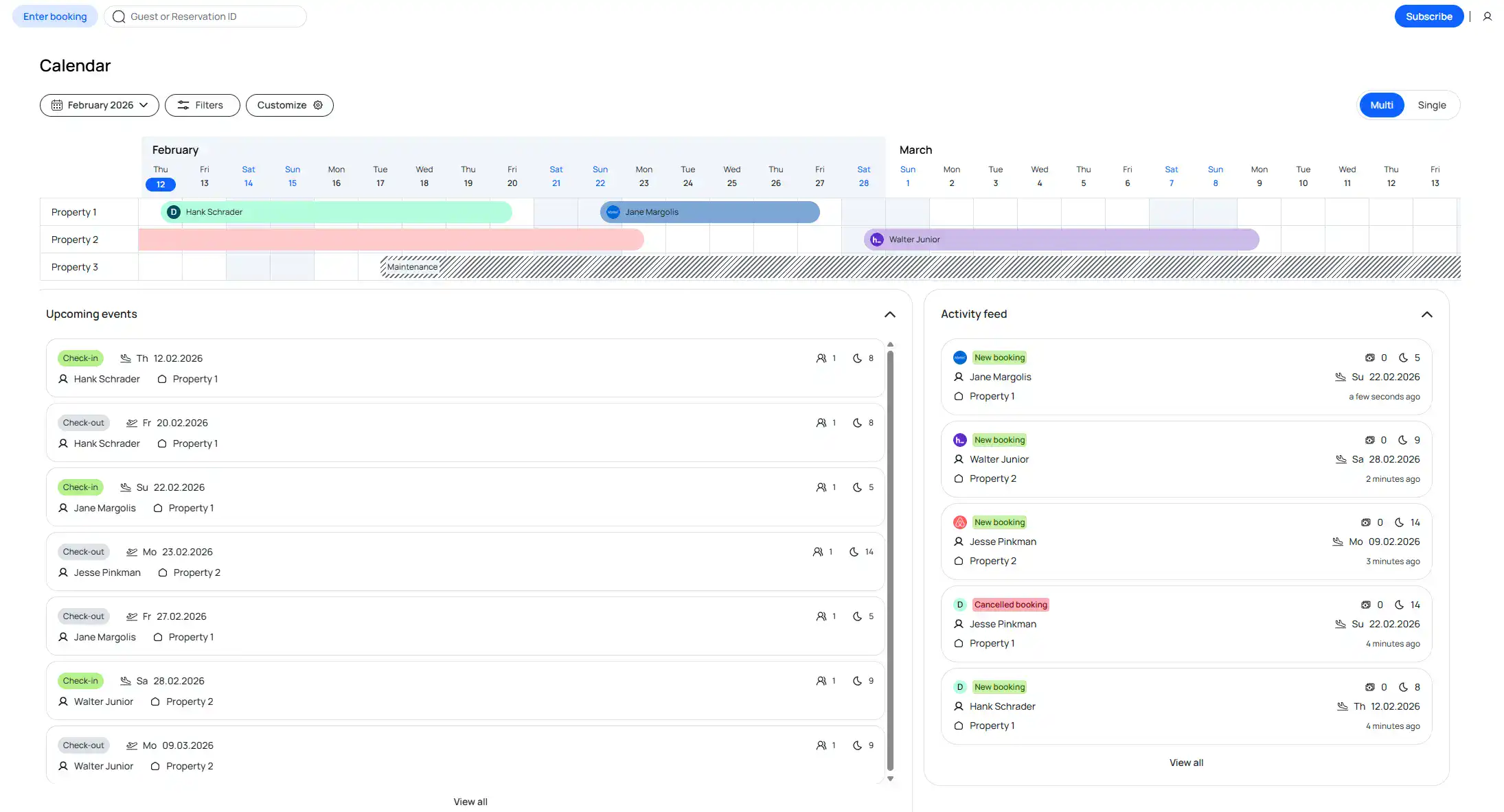
The smoobu calendar showing occupation, booking channels, guest data and an overview of upcoming events
Guest Communication & Automation
Smoobu provides centralized inbox functionality for Airbnb and Booking.com. Guest messages from these two platforms are integrated directly into Smoobu’s interface, allowing you to communicate without switching between OTA websites. Messages sent through Smoobu count toward Airbnb’s response requirements for Superhost status. For channels beyond Airbnb and Booking.com, you handle communication directly through each platform’s interface.
Automated messaging templates can be configured for key booking events. You can send automated emails to guests at specific triggers:
- Booking confirmation (immediate)
- Time-based relative to arrival/departure (e.g., “2 days before check-in”)
- Specific time of day for delivery
- Portal-specific triggers (different messages per OTA)
- Property-specific triggers
Templates support dynamic placeholders including guest names, dates, and property details. Smoobu provides pre-written templates with automatic translations in six languages (English, Italian, Spanish, French, German, Portuguese). However, automatic translations only work for Smoobu’s provided templates. Custom templates require manual translation to each language.
Automated messaging availability varies by channel. For Airbnb and Booking.com, automated messages integrate with the platform messaging systems. For Expedia, Agoda, Vacation-Apartments, and VRBO, automated emails are sent directly to guests. VRBO requires manually adding each guest’s email address to Smoobu for automated messages to work.
Response time tracking is not available. Team messaging can notify team members at key points (e.g., one day before checkout for cleaning staff).
Operations & Team Management
Account permissions allow read-only “assistant accounts” (unlimited, free) and write-access accounts (€15/month per account). You can restrict permissions to specific properties.
Smoobu does not include native task management functionality. The platform does not create automated cleaning schedules, send calendar invites to cleaning crews, or provide task assignment systems. Third-party task management and housekeeping tools (such as Doinn or TurnoverBnb) can be integrated through the Smoobu Marketplace, but this requires additional subscriptions and setup.
Hosts managing properties with cleaning teams need to coordinate these operations through external tools or manual communication.

The Smoobu Marketplace allows you to integrate additional host tools with Smoobu. Applications for Cleaning & Operations include Properly, Doinn & Turno
Guest Pricing & Payments
Rate & Discount Management
Manual pricing is managed through seasons. You create pricing seasons with different rates and booking conditions for specific periods. Each season configures nightly rates, weekend rates, minimum stays, and check-in/check-out day restrictions. You can set per-portal markups (e.g., 10% higher rates on Booking.com to offset commission costs).
Additional fees can be configured including cleaning fees, security deposits, guest-count-based charges, and pet fees. However, fee availability varies significantly by channel. The following fees are available only for Airbnb and your Smoobu website:
- Resort fee
- Community fee
- Management fee
- Linen fee
- Short-term cleaning fee
For other channels, fees must be configured in each platform’s extranet.
Discount options are similarly limited by channel. For Airbnb, you can configure:
- New listing promotions
- Last-minute discounts
- Early-bird discounts
- Length-of-stay discounts
For channels beyond Airbnb, discounts must be managed in their respective extranets. Airbnb’s “non-refundable nights” discount option is not available through Smoobu.
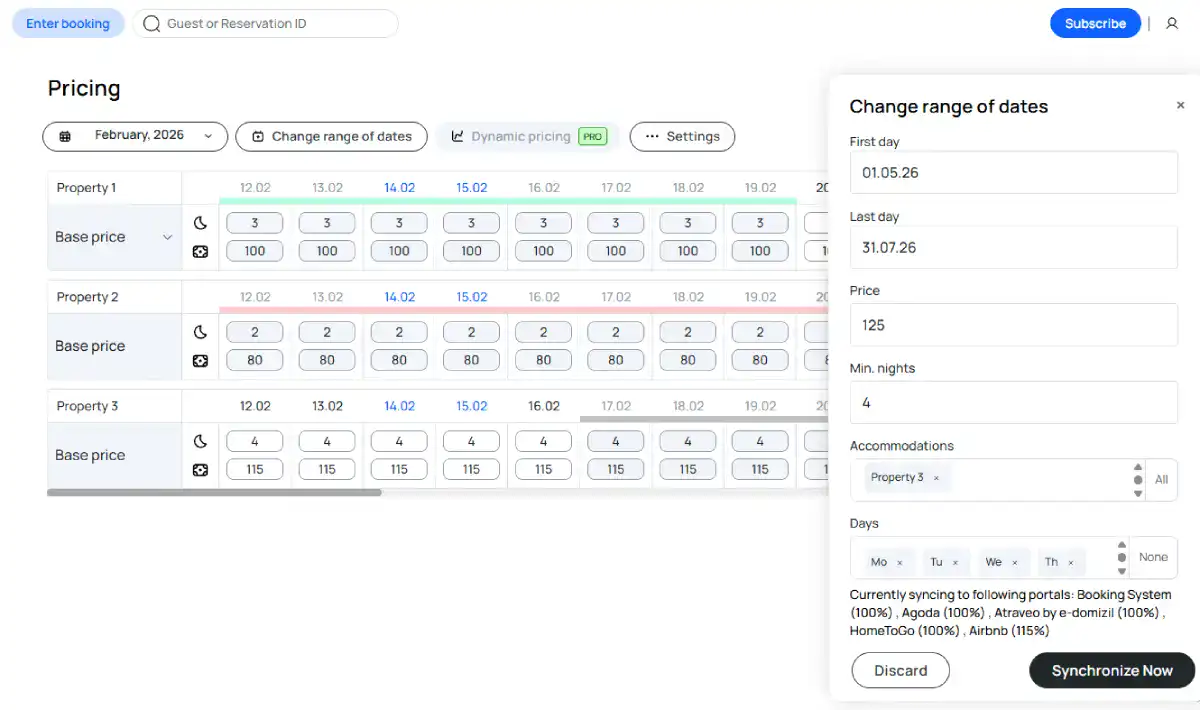
In the pricing view you can edit pricing per property. Either set prices and minimum stays for entire seasons or make quick changes directly in the overview
Smoobu offers dynamic pricing as a separate paid feature at €12.99 per month per property, not included in base subscription plans. The dynamic pricing system adjusts rates automatically based on real-time market data including occupancy, demand, and seasonality. You can select rule-based pricing for more control or choose from three data-driven strategies: conservative, recommended, or aggressive.
Prices update automatically on connected portals where rate sync is supported (primarily Airbnb and Booking.com). For channels with limited API integration, pricing must still be managed in each platform’s extranet.
Alternatively, you can integrate third-party dynamic pricing tools through the Smoobu Marketplace, including PriceLabs, Beyond Pricing, and Wheelhouse.
Payment Processing & Invoicing
Smoobu does not handle payment processing, but you can integrate 3rd party solutions via the Smoobu Marketplace. You can either rely on the OTAs payment processing options (where supported) or you integrate payment gateways including Stripe Connect (which supports SEPA, Klarna, and others), PayPal, Swikly, bank transfer, payment on arrival, or invoice options. Multi-currency support is standard across most payment integrations. Hosts who prefer a channel manager that handles payment collection entirely without external gateway setup should consider Holidu, which manages all payments and refunds as part of its commission model with no additional fees.
Refund handling depends on your payment source. For bookings through Airbnb or Booking.com, those platforms manage refunds according to your cancellation policies. For direct bookings through your website, refunds are managed through your integrated payment gateway (Stripe, PayPal, etc.).
Invoice generation is available but requires manual effort for guest invoices. The platform provides:
- Host invoices from Smoobu: Available for bulk download, documenting your fees and charges
- Guest invoices: Create standard PDF invoices with customizable templates and tax settings. In addition to this E-Invoicing is available for an additional 5.9 € per property / month and generates legally compliant electronic invoices in a structured XML format. This can be directly submitted to tax authorities.
Financial reporting is available through third-party integrations in the Smoobu Marketplace. Third-party apps can also be connected for more advanced invoice generation.
Customer Support & Onboarding
Support Availability & Channels
Smoobu provides support through live chat, phone, email, and a ticket system. An AI assistant is available in the application for initial help and routes users to human support agents for complex questions. When testing the chat, we reached a real person within minutes.
Support is available five days per week with the following hours:
- Live chat: Monday-Friday, 9:00-13:00 and 14:00-18:00 (CET)
- Phone support: Monday-Friday, 9:30-18:00 (CET)
- Weekends: Limited emergency support via ticket system only
The support team operates in eight languages: English, German, French, Polish, Italian, Spanish, Portuguese, and Greek.
Ongoing technical support has notable weaknesses. Users report response times that don’t consistently meet the promised 48-hour target, technical requests not fully understood on first contact, and the need for multiple follow-ups to resolve complex issues. Hosts that appreciate more support and need an emergency contact for weekends, can find this at Holidu.
Onboarding Process
Onboarding is self-service through the application with no setup or onboarding fees. A 14-day trial period allows you to test the platform without payment. Property import from Airbnb is available to simplify migration.
You can schedule calls with Smoobu staff for assistance, though availability varies. When testing, the next available meeting slot was one week from the inquiry date.
Initial setup support receives consistent praise. Users report quick response times (typically within 24 hours) and helpful guidance through the configuration process, contrasting with the weaker ongoing technical support.
Learning Resources
Smoobu provides multiple learning resources:
- Help Center: Detailed articles with step-by-step instructions covering platform features, integrations, and troubleshooting. In-depth videos are available to support many articles, primarily available in English. Articles in non-English languages use automated translation, which can occasionally create confusion in platform-specific instructions.
- Regular webinars: Training sessions covering topics like Smoobu features, industry trends, integration partners (smart locks, task management), dynamic pricing strategies, and channel-specific best practices. Webinars are offered in English, German, French, Italian, and Spanish.
- AI assistant: In-app help for quick questions and basic guidance
Direct Booking Website
Website Features & Customization
A direct booking website is included at no extra cost. Bookings through your Smoobu website are commission-free (no Smoobu commission, no channel commission), with only payment processing fees depending on your chosen payment gateway.
You can build a complete multi-page website where guests book your vacation rental. Bookings integrate directly with Smoobu’s calendar and synchronize with all connected channels. The website utilizes your configured payment gateway (Stripe, PayPal, Swikly, bank transfer, or other options).
Customization options include:
- Pre-made templates with theme selection
- Logo, title, intro text, and title image
- Custom color schemes or preset combinations
- Adding additional sub-pages
- Button customization
- Social media links
Property settings, amenities, and descriptions must be configured specifically for your website. This is consistent with Smoobu’s overall approach, where property content is managed separately for each platform rather than synchronized from a central database.
Domain transfer is available if you own a domain. SEO features are enabled, though the platform provides limited guidance on optimization best practices.
The open-ended customization approach has trade-offs. Experienced hosts benefit from flexibility to add content and design pages as needed. However, hosts with less web experience may struggle without structured guidance on what content to include or how to present it professionally. This contrasts with more templated approaches that limit flexibility but reduce the risk of suboptimal design choices.
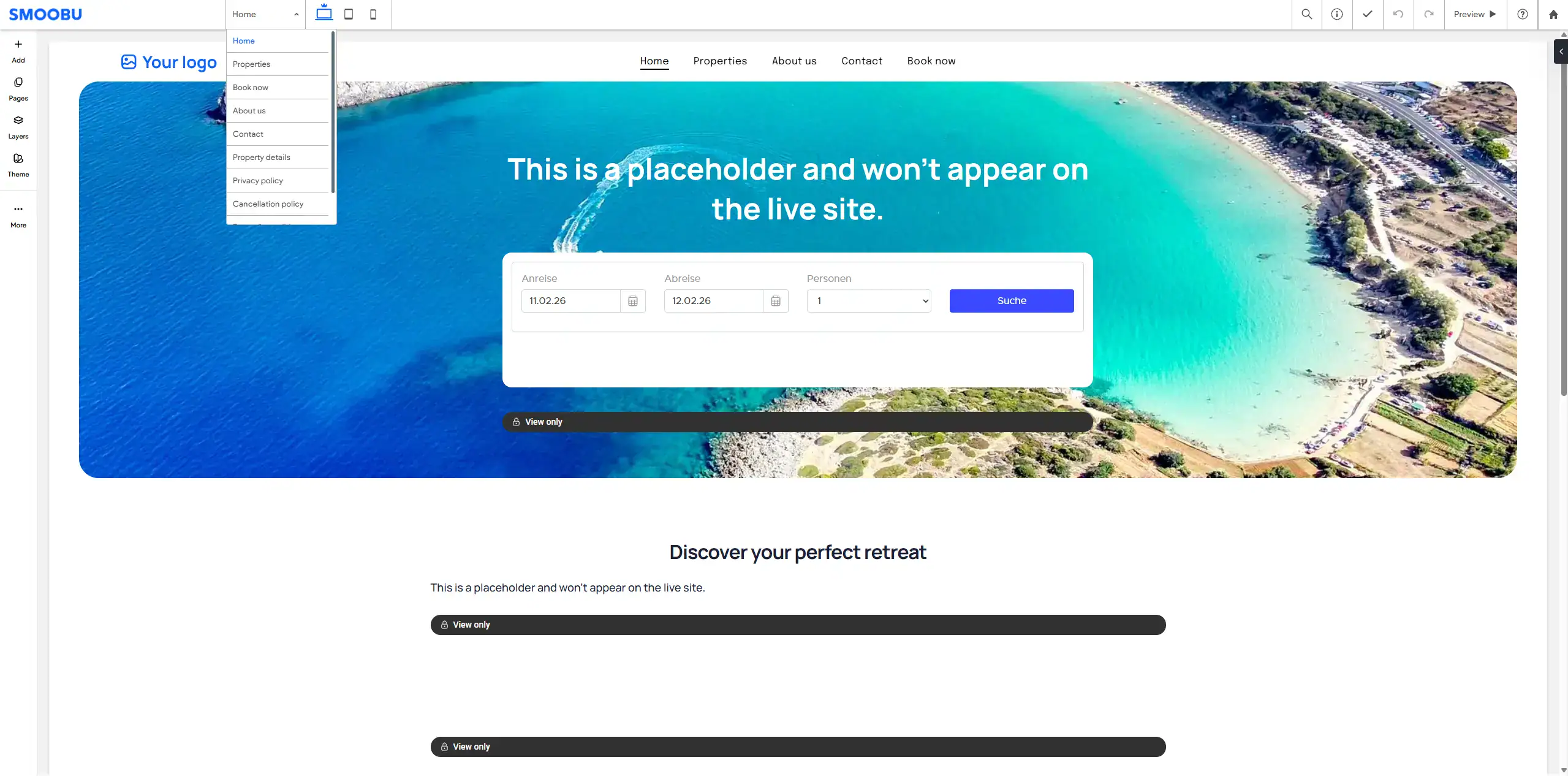
This is the website builder for your personal Smoobu website. You have a lot of flexibility on how to structure content and what kind of pages you would like to add
Integration With Existing Websites
Smoobu’s booking engine can be embedded into any existing website. The platform generates HTML iframe code that integrates with any content management system, allowing you to add booking functionality to your current site without rebuilding. This is particularly useful for hosts who already have established websites and want to add direct booking capabilities. The booking engine is also fully synced with your Smoobu calendar.
Settings configured in the booking engine apply to both embedded bookings and your Smoobu-built website, ensuring you manage pricing, availability, and property information in a central place. The booking engine includes customization options for cancellation policy text, payment method descriptions, success messages, and custom CSS styling. Conversion tracking tags can be added for marketing analytics.
For popular website builders, Smoobu offers integrations through the Marketplace for platforms like WordPress and Wix, simplifying the embedding process for non-technical users.
User Experience & Interface
User opinions on Smoobu’s interface are divided. Hosts with technical backgrounds and prior property management software experience frequently describe the interface as intuitive and straightforward. However, a notable portion of users report a learning curve, confusion navigating certain features, or finding the interface less intuitive than expected.
Platform stability presents notable concerns. In our analysis of online reviews, approximately 28% mentioned technical issues and bugs—a notably higher rate compared to competitors. Performance issues include slow-running interfaces, frequent session logouts, and reduced functionality with browsers other than Chrome. Google Chrome is strongly recommended for optimal performance, as users report significant limitations with Safari, Firefox, or Edge. Rate and availability updates sometimes require manual verification or retry, and some users report calendar sync glitches across channels.
Your experience with the interface will likely depend on:
- Technical background and comfort with software platforms
- Prior experience with property management systems
- Complexity of your use case (single vs. multi-property management)
Recommendation: Use the 14-day trial period to assess whether the interface aligns with your workflow and technical comfort level, and test on your preferred browser to verify compatibility.
Smoobu Pricing: Plans and Costs per Property
Prices as of October 2026, billed yearly
Smoobu offers subscription based pricing at a flat fee each month. A more flexible option is available with lower flat fees and an additional booking commission. You might face additional costs when you need more accounts with writing access (15 € / month or choosing the Teams Pro+ plan) or if you want to activate Smoobu’s dynamic pricing (12.99 € per month). All costs are per property.
A flat subscription fee might be especially attractive for high priced properties, which tend to be at a disadvantage if a commission is introduced based on the income. For properties with lower price per night commission-based pricing or within Smoobu the “Professional Flex” package might be the more attractive deal.
Pricing changes based on the payment frequency. There are options available with monthly, yearly and two-year payments – tending to grant bigger discounts the further you pay in advance. Adding more than one property reduces your price per additional property significantly. For example if you list 5 properties in the Professional Pre-paid plan, the monthly cost per property is reduced to 14.94 €, making it significantly cheaper than competitors.
Professional Flex
- Channel Management
- Central booking calendar
- Support (Email, phone, chat)
- Website builder & booking website
- Marketplace for third party integrations
- Automated messaging
- Centralized Inbox for Airbnb & Booking.com
- Unlimited assistant accounts
Professional Pre-paid
Same as professional Flex, but without booking commission
Teams Pro+
Additional features:
- E-Invoicing
- Prioritised customer support
- An additional write access account (usually 15€ / month)
- 2 months free Dynamic Pricing
Sign up for Smoobu today
Profit from a free 14-day trial period to set up your account and see if the application is a fit. Sign up through this link and save 10% on your Smoobu fees.
Conclusion: Who is Smoobu for?
Smoobu differentiates itself through cost optimization rather than comprehensive feature coverage. The platform’s subscription model delivers measurable savings for properties generating significant revenue, particularly those with high nightly rates where commission-based alternatives (3-6% of booking value) become expensive at scale. This budget-focused positioning requires accepting operational trade-offs that define the platform’s target market.
The most significant trade-off is manual property content management. Unlike competitors where descriptions, photos, and amenities sync automatically from a central dashboard, Smoobu requires separate entry in each channel’s interface. For hosts managing 1-3 properties primarily on Airbnb and Booking.com, this represents manageable workload. For larger portfolios or diversified channel strategies, the operational overhead becomes impractical. Similarly, integration depth beyond these core platforms remains limited. VRBO syncs via iCal with delays, secondary channels handle only availability and rates. Hosts requiring extensive multi-channel distribution will encounter friction Smoobu doesn’t resolve.
Beyond content synchronization limitations, Smoobu provides many features to manage your property efficiently. The platform offers dynamic pricing as a paid add-on, while task management and accounting tools connect through the Smoobu Marketplace. Automated messaging templates handle basic communication flows effectively. The direct booking website provides commission-free reservations with customizable templates, adding genuine value for hosts driving traffic to their own domains. Overall, Smoobu suits technically self-sufficient hosts who can coordinate multi-platform operations independently and value predictable costs over operational convenience.
Right Choice For
- Independent hosts with 1-5 properties primarily using Airbnb and Booking.com
- Hosts with high value properties, who prefer predictable subscription costs over variable commission
- Cost-sensitive hosts that value lower costs higher than convenience
Wrong Choice For
- Hosts with large portfolios, expecting centralized property content management across all channels
-
Hosts who rely heavily on channels beyond Airbnb and Booking.com
-
Property management agencies requiring owner-specific invoicing and commission splits
Alternatives to Smoobu
If Smoobu doesn’t match your specific needs, these alternatives are worth considering. Each property management system has distinct strengths—explore which platform best fits your vacation rental operation.

Holidu

Lodgify
Frequently Asked Questions
How much does Smoobu cost per month?
Smoobu costs from 29 € per month and property on the Professional Flex plan, plus a 0.9% booking commission. Without commission, you pay 31.50 € on the Professional Pre-paid plan and 49.50 € on the Teams Pro+ plan, per property and month. All prices apply to yearly payment, other billing intervals have different rates. Teams Pro+ adds e-invoicing, prioritized support and one additional write-access account. Further write-access accounts cost 15 € per month, dynamic pricing 12.99 € per month and property.
What is Smoobu?
Smoobu is a channel manager and property management system for vacation rentals. It lets you manage calendars, rates and guest messages for several booking platforms in one place. Smoobu connects your property via API to Airbnb, Booking.com and other platforms and syncs availability and rates. It also includes a website builder for direct bookings and a marketplace for third-party tools. You pay a flat monthly fee per property instead of a commission on every booking. Only the Professional Flex plan adds a 0.9% booking commission.
Is Smoobu legit?
Yes. Smoobu is an official partner of the two largest booking platforms: it holds Airbnb Preferred Software Partner and Booking.com Premier Partner status. Your Airbnb account stays your own, including your listing, reviews and Superhost status. You can test Smoobu free for 14 days without entering credit card or bank details. Support is available in English by phone, email and chat. The limits lie in the software, not in its legitimacy: you manage property content separately in each channel, and weekend support is limited to emergency tickets.
Does Smoobu charge a commission per booking?
It depends on the plan you choose. The Professional Flex plan includes a 0.9% booking commission on top of the monthly fee. The Professional Pre-paid and Teams Pro+ plans use flat monthly fees with no booking commission. Unlike commission-based platforms, Smoobu never charges a percentage of your total booking value beyond this optional 0.9% on the Flex plan.
On which platforms will my property be listed if I work with Smoobu?
Smoobu lists your property on Airbnb, Booking.com, Expedia, HomeToGo (incl. Casamundo, E-domizil, Amivac, EuroRelais, CaseVacanza, Holidayhomes, Vacances, Wimdu), Agoda, Trip.com, HRS Holidays, BestFewo and several regional channels (e.g. via Feratel).
These connections sync availability and rates. Full sync including messaging, fees, discounts, etc. is only available for Airbnb and Booking.com. Availability of certain channels varies depending on the region of your vacation rental.
Does Smoobu offer customer support in English?
Yes, Smoobu offers support in English. The support team further covers German, Spanish, French, Italian, Portuguese, Greek, and Polish. You can reach them via phone, email, contact form or chat.
Does Smoobu work with Airbnb and Booking.com?
Yes. Smoobu connects to Airbnb and Booking.com via direct API and is an official partner of both platforms. For these two platforms, Smoobu syncs availability, rates, fees, discounts and messages in real time. Smoobu connects to your existing accounts, so you keep full ownership of your listing, your review history and any Superhost status you have earned. You can add platforms without API support through iCal sync. This causes delays and raises the risk of double bookings.
What are the differences between Smoobu and Holidu?
Smoobu and Holidu take fundamentally different approaches to vacation rental management.
The most significant difference is pricing. Smoobu uses flat monthly subscription fees starting at 29 € per property (Professional Flex, plus a 0.9% booking commission) or 31.50 € without booking commission, while Holidu charges a commission of 3% to 6% per booking. For properties with high nightly rates, Smoobu’s fixed costs are generally the more affordable option. For properties with lower nightly rates or hosts who want to avoid fixed monthly costs, Holidu’s commission model can be the better fit.
On channel reach, Smoobu offers full API integration for Airbnb and Booking.com, with additional channels like Expedia, Agoda, and Trip.com available via API for availability and rates only. Holidu connects your property to 15 to 28 booking platforms depending on your region, all via real-time API sync.
Channel management also works differently. With Smoobu, you keep your existing accounts on each booking platform, preserving your personal host profile and Airbnb Superhost status. Property content including descriptions, photos, and amenities must be managed separately in each channel’s interface, as only availability and rates are synchronized centrally. With Holidu, all listings are managed from a single account with property descriptions, photos, and settings syncing automatically to all connected channels, but your listings appear under Holidu’s name rather than your personal profile.
Smoobu integrates with around 51 third-party tools through its Marketplace, including dynamic pricing and task management solutions. Holidu offers no third-party integrations. Holidu operates 27 local offices across Europe providing regional in-person support, which Smoobu does not offer.
What are the differences between Smoobu and Lodgify?
Smoobu and Lodgify are similarly priced subscription platforms, but they differ in several meaningful ways.
On channel coverage, property content including descriptions, photos, and amenities must be managed separately in each channel’s interface with Smoobu — only availability and rates are synchronized centrally. Lodgify pushes property content to all directly connected channels including Vrbo and Expedia, reducing manual work across platforms. Lodgify’s unified inbox also extends to Vrbo and Expedia alongside Airbnb and Booking.com, while Smoobu’s centralized inbox covers Airbnb and Booking.com only.
Lodgify’s website builder is its clearest differentiator, combining ease of use with modular customization and commission-free direct bookings. Smoobu includes a website builder as well, but with more limited customization options. Lodgify also includes native task and cleaning management in its Ultimate plan, while Smoobu relies on third-party integrations for this.
For multi-unit properties, Smoobu handles individual units more cleanly within its pricing structure. Lodgify charges per listing, which becomes expensive when managing multiple units within one property.
How can I reach customer support as a host?
Smoobu support is available via live chat, phone, email, and a ticket system. An AI assistant within the application handles basic questions and routes more complex issues to the support team. Live chat and phone are available Monday to Friday during business hours (CET). Weekend support is limited to emergency tickets only. For onboarding assistance, you can schedule calls with Smoobu staff, though availability varies and waiting times of up to one week have been reported.
How many properties is Smoobu suitable for?
Smoobu works best for independent hosts managing one to five properties, primarily using Airbnb and Booking.com. For larger portfolios or hosts distributing across many channels, the need to manage property content separately in each platform’s interface creates significant additional workload. Multi-unit properties are supported, allowing several individually bookable units within one property.
Can Smoobu schedule cleanings?
Only to a limited extent. Smoobu has no built-in task management. It does not create automated cleaning schedules, send calendar invites to cleaning crews or assign tasks. You can, however, create free read-only assistant accounts for cleaning staff and notify your team automatically, for example one day before checkout. For full cleaning schedules, connect tools like Properly, Doinn or Turno through the Smoobu Marketplace. These tools require their own subscription.
Can I test Smoobu for free?
Yes. Smoobu offers a 14-day free trial that gives you full access to set up your account and explore all platform features before committing to a subscription. No credit card or bank details are required to get started.
Does Smoobu provide an app for my smartphone?
Yes, Smoobu offers apps for both Android and iOS.
